
TikTok Shop Livestream Selling Checklist: A Beginner-Friendly Framework (Flow + Metrics + Trust)

Strong livestreams make it easy for viewers to understand a product, ask questions and decide what to explore next. A clear format helps presenters guide an engaging experience from the first minute.
This practical TikTok Shop livestream checklist introduces a repeatable selling flow, a preparation and follow-up routine, and useful metrics to review performance. It offers a foundation for teams exploring more confident, consistent live presentation.
What you’ll learn today:
A simple live flow that improves clarity and reduces drop-off
A checklist for prep, delivery, and after-live follow-up
The first metrics to track (without overwhelming dashboards)
Trust-first rules that protect your brand and customers
A practical example you can model for your next live
TikTok Shop Training blog post:
Explore TikTok Shop training insights
What Makes a Strong TikTok Shop Livestream
An effective livestream brings together a few practical elements:
A clear opening that tells viewers what to expect
Focused demonstrations that make benefits and comparisons easy to understand
A relevant next step that viewers can act on
Trustworthy explanations delivered with clarity and confidence
A repeatable flow creates a stronger viewer experience and gives teams a consistent foundation for reviewing and improving each session.
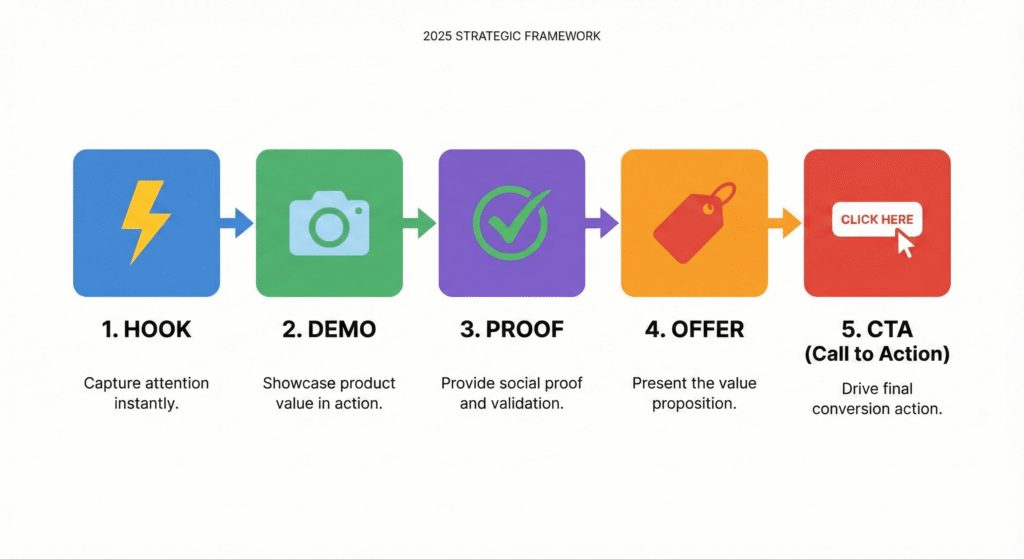
The beginner livestream flow: Hook → Demo → Proof → Offer → CTA
This is a simple five-part flow that works well for retail livestreams. It’s intentionally high-level, enough to create structure without giving away training scripts.
1) Hook (5–10 seconds)
Purpose: tell viewers what they’ll get immediately.
One sentence: what category + what benefit
One sentence: who it’s for
Example (generic):
“Today I’m showing three beginner-friendly options for [need], and I’ll help you pick the right one in under a minute.”
2) Demo (20–40 seconds)
Purpose: show the product simply and clearly.
Keep it to 2–3 key points (problem → benefit → best-fit customer)
Use plain language
3) Proof (10–20 seconds)
Purpose: reduce doubt.
Proof can be:
a clear comparison (“If you want X, choose A; if you need Y, choose B”)
a transparent note (“This is best for daily use; for heavy use, choose the stronger model”)
customer-friendly policy clarity (shipping/returns availability—only if you can state it accurately)
4) Offer (10–20 seconds)
Purpose: clarify what the viewer gets and why it’s a good value.
Don’t over-hype. Keep it simple:
what’s included
what problem it solves
why it’s appropriate for a specific use case
5) CTA (5–10 seconds)
Purpose: tell viewers what to do next—clearly.
Examples:
“Comment your budget range and I’ll recommend the right option.”
“Type A or B and I’ll compare them quickly.”
“If you want the everyday best-seller, choose option 1.”
You don’t need a “hard sell.” You need a clear next step.
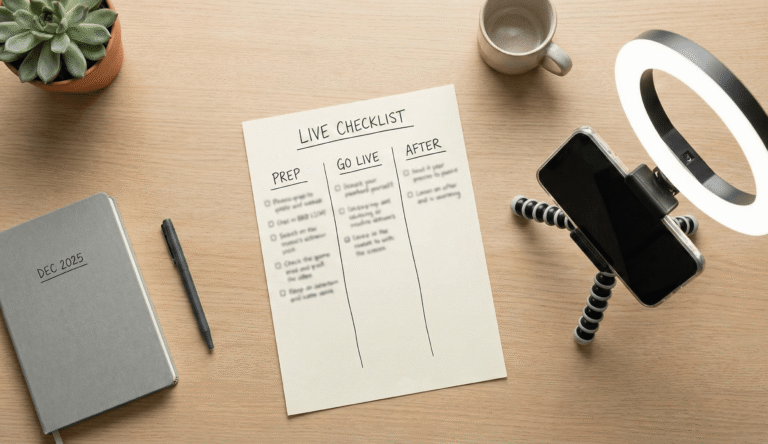
Step-by-step TikTok Shop livestream selling checklist (prep → live → after)
This is a high-level checklist designed to be reusable. Training is where teams get deeper scripts, roleplays, and feedback scoring.
Part 1: Prep checklist (15–30 minutes)
Setup
Stable tripod, clean lens, strong lighting
Clean background (remove clutter)
Clear audio (quiet room, avoid echo)
Product planning
Choose 3–6 products max for a beginner live
Decide order: start with a strong “hero” product, then variety, then best-seller
Prepare a simple “compare” line for each product (who it’s for)
Talking points
For each product, write 3 bullets:
Problem it solves
Key benefit (one clear benefit, not five)
Best-fit customer type
Trust & compliance
Avoid exaggerated claims (“best on the market,” “works for everyone”)
Be transparent about limits (“best for daily use,” “not ideal for heavy-duty use”)
Never show customers or private areas without consent
Part 2: Go-live checklist (keep it consistent)
Opening (first 20–30 seconds)
Say what this live is about
Say what viewers will learn
Tell them how to participate (comment A/B, budget range, etc.)
During the live
Follow the same flow every product: Hook → Demo → Proof → Offer → CTA
Keep a calm, helpful tone
Repeat key points for new joiners (short, not repetitive speeches)
Engagement prompts (simple)
“Comment your budget range.”
“Vote 1 or 2.”
“Tell me the use case: daily / gift / upgrade.”
You don’t need complex engagement tricks, just consistent prompts that help viewers decide.
Part 3: After-live checklist (make improvement measurable)
Quick review
What product got the most questions?
When did viewers drop off (beginning, middle, end)?
Which CTA got the most responses?
Content reuse (optional, simple)
Save one useful segment idea for a short clip
Note the top 3 questions to answer next live
Plan the next live
Choose 1 theme (one category or one customer need)
Keep the structure the same; improve one thing at a time
Structure creates repeatability. Repeatability creates performance.
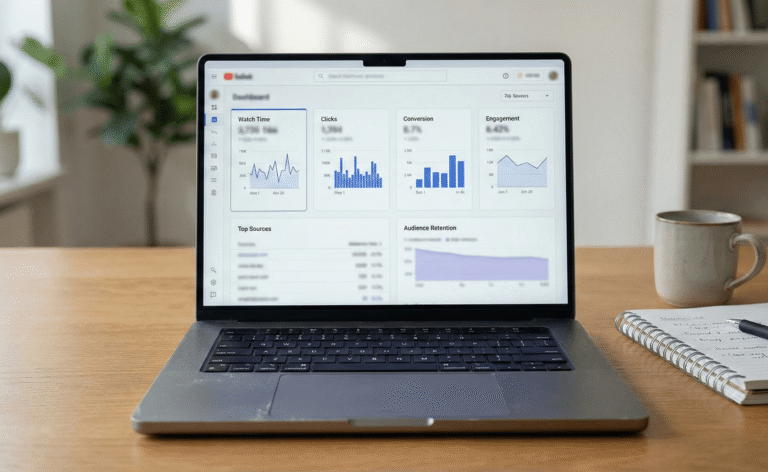
Metrics that matter first (without getting overwhelmed)
You don’t need to track everything at the beginning. Start with a few metrics that reflect clarity and intent:
1) Watch time / retention
If viewers leave quickly, the opening hook or structure is unclear.
2) Clicks (or product page taps)
This shows intent, viewers are curious enough to explore.
3) Conversion (orders)
Conversion often improves after structure and trust improve. Don’t panic if conversion starts low, fix clarity first.
4) Engagement (comments)
Comments often indicate what’s unclear. The best improvement plan comes from recurring questions.
Beginner approach to improvement:
Pick one metric to improve per week (e.g., retention), adjust one thing (clearer opening hook), and keep everything else consistent so you can see what worked.
Trust & compliance basics (privacy, claims, customer respect)
Trust is not a “nice-to-have.” On livestream, trust is the conversion engine.
Privacy and consent
Don’t film customers or staff without explicit permission
Be careful with reflections and background screens
Avoid showing receipts, addresses, or private messages
Truthful product claims
Don’t claim results you can’t prove
Don’t imply guarantees beyond what you can support
If unsure, say so and offer to confirm later
Customer-friendly tone
Pressure language can backfire fast on live. Prefer:
calm comparisons
clear best-fit guidance
transparent limitations
If you need compliance references, use official sources like PDPC (privacy), ASAS (advertising), and CASE (consumer guidance), plus TikTok’s official policy/help resources.
Personal Shopping & Livestream Skills course page:
Explore livestream training
Turn Livestream Structure Into Confident Team Delivery
A repeatable live-selling format provides the foundation. Green Motion Academy helps organisations connect customer understanding, product storytelling, presenter skills and practical review methods to meaningful team-development priorities.
Exploring how to strengthen your retail or social-commerce team? Our team can help you frame the capabilities you want to develop and discuss an appropriate learning pathway.
Explore livestream training or discuss your team’s training priorities with GMA.
For more practical perspectives, explore GMA Insights.
Green Motion Academy shares professional perspectives on workforce capability, regional market development, electric mobility and cross-border collaboration across Asia.
You may also like
Explore the qualities that make an overseas partner commercially relevant, from market access to practical collaboration, with insights from GMA.
Designing Capability Transfer Around Real Workplace Outcomes
Learn how a structured capability transfer programme connects specialist knowledge, practical learning and workforce objectives.
Turn overseas market interest into a more focused expansion plan using commercial objectives, partner priorities and structured next steps.